
AI Guide: Getting Started
Here’s the good news: AI is capable of endless solutions. Now, here’s the bad news: AI is capable of endless solutions.
The real challenge is figuring out the right problems for AI to solve to strengthen your organization. This requires a different way of thinking that may not be part of your day job as a journalist or publisher. While you don’t have to be an engineer to apply AI successfully, you do need to think holistically and carefully about problems, solutions, and capabilities.
That's because the world of AI is filled with solutions in search of a problem. You need to start with the problem and figure out whether AI is the best solution for it.
Think about it this way: You can do a math problem a lot of ways — use a calculator, scratch it out on paper, or input it into a spreadsheet. The best tool to solve it will depend on the math problem’s inputs and desired output: Do you need a straightforward answer very quickly? Calculator. Do you want to think thoroughly through the process of addition and subtraction? Do it manually on paper. Do you need to adjust the values in the problem to show the range of solutions? Spreadsheet.
It’s the same idea with AI: You can use it to do a lot of things, but you want to make sure you’re matching your problems with the appropriate solution.
How to Get Started
Step 1: Play around with it (if you haven't already)
If you’re using AI for the first time, a chat application (Claude, GPT, etc.) via a web browser is the easiest place to start.
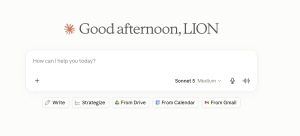
If you’re using AI for the first time, a chat application (Claude, GPT, etc.) via a web browser is the easiest place to start. After you sign in, you’ll see something that looks like this:
ChatGPT

Claude
Gemini

The web browser version for each of these is pretty similar. The core input is known as your “prompt” (see Foundational Concepts), or what you’ll type in the window.
A few things you should notice about your screen:
- The features and settings are on the left-hand side.
- Instead of typing, you can also try “dictate” or voice mode, which is an audio conversation instead of typing.
- In the prompt bar, you’ll see an option to pick what kind of model to use. You should pick the most capable model for the task with the minimum firepower, because more advanced models are more expensive.
Perhaps you’ve tried AI before, and you were disappointed with the results. In this case, you should try again. The models (again, see foundational concepts) are improving every few weeks, and the error rates and hallucinations decrease with each release.
Important: Take a minute to check your “memory” settings. AI can be effective because it has a limited memory (context window), but you’ll also want to decide if you’re OK allowing the LLM to train on your inputs (what you type). This is often the default for most free versions of AI applications, and it comes with security and privacy concerns.
In ChatGPT, you can find this in the Settings menu, under “Data Controls” and “model improvement.” In Claude, you can find this in the Settings menu, under “Privacy” and “help improve our AI models."
Step 2: Prompting 101
The more details that you put into the prompt, the better the results you'll get. This is what separates AI from essentially a more advanced search application to a truly powerful tool for your work.
You should treat an AI chatbot like the smartest, greenest intern you’ve ever had: You must over-explain everything. You’ll also want to minimize the errors by asking for citations, keeping your prompts simple but iterative, and pushing back if an output seems wrong.
A strong prompt can include the following:
- Key context about what you’re trying to achieve (including attachments)
- The format of the output you want or what the answer should look like
- Any pitfalls to avoid or consider
- A request for sources and verification
- A reminder to be honest if it doesn’t “know” the answer or to state how certain it is in its response (80 percent, etc.). Once you have a preferred account, you can also include this as special instructions in your settings.
Here’s a comparison of a good prompt and a stronger version:

Step 3: Refine your prompt
Even the best prompts rarely get it right on the first try. You’ll want to continue to guide and reiterate the chat to get your desired response.
If you aren’t satisfied with the response, try the following:
- Add more context, with additional documents as models. This can include your own writing samples if you want it to keep consistent with your voice.
- If you haven’t yet, ask for its sources, or why it chose to respond how it did – anything from why it chose a certain format to what data it picked to highlight.
- Ask it: “What did I miss?” or “What could make this output better or more complete?” At best, you might find a blind spot in your own logic or work.
- Tell the AI what went wrong. As users, we’re accustomed to just accepting the answer the technology gives us (think of a spreadsheet calculation, or even a web search). AI is different; if you think it’s wrong about something, you should tell it so. AI can double-check itself.
Selecting the Right AI Tool for the Job
In addition to picking the right model, you’ll also want to think about which AI tool best serves your project or desired outcome. There are a lot of options, and what’s more, there are options within each application.
Notably, AI companies release new features and tools weekly (sometimes more often than that!), so this landscape can change very quickly.
Here’s a chart to get started:
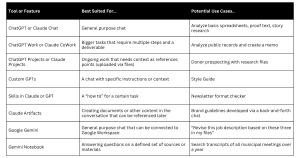
One more key strategy as you try out these tools: Don’t be afraid to bounce them off each other to see what yields the best response. You can offer the same prompt to similar tools (Claude Chat, ChatGPT) and see which yields the best response. You can ask Google Gemini what the best use cases are for Claude CoWork given what it knows about you. Or use GPT to help build skills files for Claude.
Thinking Bigger about Building Workflows
What takes up an outsized amount of your or your staff’s time in a week? If it’s menial and repetitive, it’s a great place to start.
Think about the tasks that are mundane, repetitive, and yet need to get done: Scheduling editing shifts, double-checking your style guide, or updating the advertising rate card.
Take your boring-but-necessary work, and answer these questions:
- What problem does this task solve? What is the pain point?
- What needs to happen for this to be complete?
- What is dependent on the results?
Let’s build a couple of examples:
Task no. 1: There are 12 grant opportunities that you’d like to seek out this year, but they are difficult to track and manage across the news cycle (along with everything else you have on your plate). You try to put dates in a calendar, but that’s time-consuming and difficult to track – let alone make time to complete them.
- What is the task at hand? What is the pain point that it solves? The task is tracking and managing a variety of information sources and requests for funding. In the end, the goal is to generate more revenue. This work directly addresses financial solvency.
- What needs to happen for this to be complete? Applications must be completed and sent in a timely manner to the granting organizations.
- What is dependent on the results? Financial health of the organization.
Task no. 2: You’re always fixing the style issues in your copy – and because it’s not your primary job, you inevitably miss key discrepancies.
- What is the task at hand? What is the pain point that it solves? We need to make sure our style for certain words is consistent – especially those around more sensitive issues in our reporting.
- What needs to happen for this to be complete? The story needs to be checked not only for grammar and spelling, but also style before it is published.
- What is dependent on the results? Publishing speed, editorial integrity, and brand consistency.
Now you can figure out whether AI will provide a good solution. Go back to the AI Use Cases chart in the first section of this guide (Foundational Concepts page).
The first problem (grant opportunities) is a better fit for AI because it takes unorganized information and adds structure to it. You can start a project file with grant information and deadlines, feed your successful applications and impact report as context, and AI could give you a calendar with key deliverables, as well as help you draft the first version (if allowed by the grant-making organization).
The second problem (style book) is a solid solution for AI to tackle, but it’s harder to implement. First and foremost, the end result is public-facing, so your mistakes will be highly visible. Second: This solution requires precision in a way that requires a lot of training. You’ll want to consider how you’ll track and approve changes if you’re using a custom GPT or chat application.
The best way to do this is to start building. And if you get stuck, ask the Chatbot – it should guide you through the process. Once you have a few of these projects, applications or GPTs complete for your personal use, you’re in a much better place to start talking about AI with your staff and colleagues.
What AI Can Do For Your Organization
Think beyond your own plate and consider your organization’s greatest challenges and pain points. What are the top hurdles to your publication’s success? Is it revenue diversification? Audience engagement? A resource-lacking membership campaign? Unclear editorial impact? Just like the small stuff, AI is not well suited to solve all of these — but there are certain problems that it’s suited to help.
Step away from the screen, and write down the top three challenges by hand. What would it take to solve these problems? What hurdles need to be overcome? What people are involved? What information does it require? Can you break down those processes into distinct steps?
Take, for a final example, this pain point: Your monthly audience is in decline, and you don’t know why.
- What is the task at hand? What is the pain point that it solves? You need to determine each week what is driving audience decline. You have hunches, but they’re hard to track each week in the hectic news cycle. Most importantly, you need some actionable ideas that address this decline.
- What needs to happen for this to be complete? A well-informed, weekly analysis of traffic data from several different sources, measured against editorial output.
- What is dependent on the results? Revenue, editorial priorities, and long-term planning.
Now, put together a process diagram with steps and gates:
Data input into the system from several sources → editorial output is calculated → data is analyzed against benchmarks → report developed for a team with recommendations. This is a good solution for AI because it’s based on categorizing and analyzing data, and it has a clear deliverable in the report. Now consider what you’ll need to make this a success, including AI-ready data sources, an easy way to collect that data, and a set of clear prompt instructions to synthesize this and schedule regular delivery.
You want to be careful not to overcomplicate the process map. But you also want the end result to be useful enough to have a meaningful impact on your workload or business.
Is it Worth Building?
There are always trade-offs — even when the investment is only your time and headspace. You’ll want to consider these consequences as you go about designing and supporting new workflows, features, and builds.
Enter the Effort/Impact Matrix. This is an easy framework to consider whether the project will be worth the investment. Consider where your AI solution might end up on this map:

Especially in a resource-constrained organization, you don’t have the bandwidth to pursue many solutions on the left side. You’ll want to focus your energy and resources on the right side.
Since trust is paramount in the news publishing business, you’ll also want to run the project through a risk assessment (for more on this, see the AI Governance and Policies page). There are trade-offs here as well.
Consider the following hypothetical scenarios:
- What if AI enables your team to send more fundraising emails, but they are of lesser quality – or the increased frequency annoys your supporters?
- What if you have one inaccurate AI-generated image, even if you’ve had hundreds of high-quality ones? What has that cost you?
- What if one of your reader-facing AI experiments yields unpredictable and poor responses? What does that do to your credibility?
The next section will delve into the importance of experiments, and how to design them in a way that minimizes risks.
If this seems like a lot of steps, consider that you’re not just creating a solution to a single problem. At this point in the process, you’re still building credibility in AI’s potential to help your publication. You’re creating a landmark use case that will serve as proof to others. A strong use case is the most vital step in this process.
Additional Reading and Resources
Generative AI was used to refine the writing and check content on this page. All content was created, reviewed, and verified by a human, who takes full responsibility for its accuracy.